VS Code Copilot
Run Blackfuel's open-source models in VS Code Copilot Chat — transparent per-token pricing, and an EU option
Blackfuel serves open-source models on an OpenAI Chat Completions-compatible API, with transparent per-token pricing and an EU option, and you choose which model runs and where. Blackfuel runs in Copilot Chat through VS Code's Custom Endpoint (Bring Your Own Key) provider, which accepts any Chat Completions-compatible endpoint.
This cookbook is for any developer who wants Copilot's chat experience on open-source models — with transparent per-token pricing and control over which model runs, and where.
What you get
| Benefit | Detail |
|---|---|
| Transparent pricing | Published per-token rates — you pay for the tokens each request uses. See Available Models. |
| Open-source models | Open-weight models for code generation, edits, and agentic work. |
| EU data residency | Models with an EU variant take a :eu suffix that keeps requests inside EU data centers. See Available Models. |
| Model portability | Switch models — or providers — by editing one config block. No lock-in. |
Recommended models
Two models cover most coding workflows. Use the model ID (the id field) exactly as shown.
| Model | id | Use it for |
|---|---|---|
| GLM 5.2 | zai-org/GLM-5.2 | Code generation, edits, and agentic tasks |
| Gemma 4 31B (EU) | google/gemma-4-31B-it:eu | Prompts that include screenshots or images, EU-hosted |
Take each model's context window, input modalities, and per-token pricing from GET /v1/models or Available Models — you need the context window in Step 4.
Prerequisites
- VS Code 1.122 or later, where the Custom Endpoint provider is available in Stable, with the GitHub Copilot Chat extension.
- A Blackfuel API key — create one here.
BYOK powers Copilot chat, tools, and MCP servers only. It does not cover inline code completions or Next Edit Suggestions (NES) — those continue to use GitHub's built-in completion model.
Step 1: Get a Blackfuel API key
Create a key on the API Keys page of the Blackfuel console and copy it (it starts with bf_). Keep it handy — VS Code will ask for it in Step 3.
Step 2: Open the Language Models editor
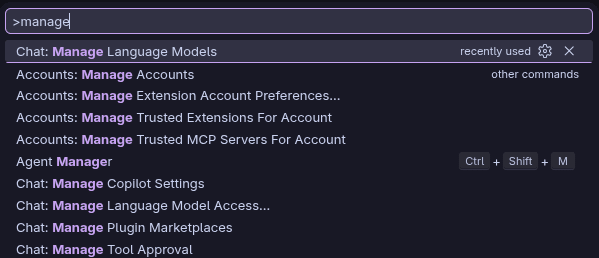
Open the Command Palette (Ctrl+Shift+P / Cmd+Shift+P) and run Chat: Manage Language Models. You can also reach it from the model picker in the Copilot Chat input by selecting Manage Language Models (the gear icon).
Step 3: Add a Custom Endpoint provider
In the Language Models editor, select Add Models, then choose Custom Endpoint from the provider list.
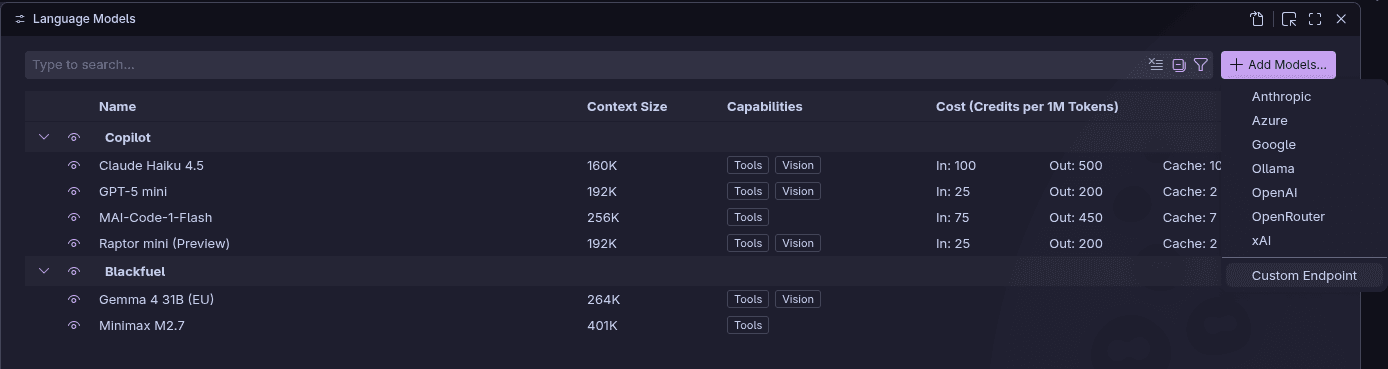
VS Code then walks you through the provider details:
- Group name — a label for this provider group. Enter
Blackfuel; it becomes the heading you'll see in the model picker. - Display name and API key — a name for the endpoint, then your Blackfuel key from Step 1.
- API type — choose Chat Completions.
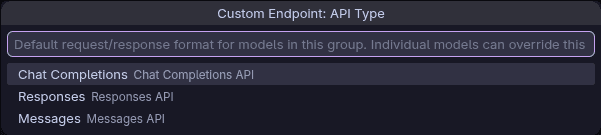
VS Code stores the key securely and references it from the config as an ${input:...} placeholder — you never paste the raw key into the JSON yourself.
Step 4: Paste the model configuration
VS Code opens a JSON editor for the Custom Endpoint, pre-filled with the group, vendor, apiKey reference, and API type from Step 3. Make the file match the configuration below — the models array is where you list the Blackfuel models. Leave the apiKey line as VS Code wrote it: ${input:chat.lm.secret.xxxxxxxx} is a reference to the key you entered in Step 3, which VS Code keeps verbatim in the file and resolves to the real value only when a request is made (your reference id will differ from this placeholder). Never paste your raw bf_ key here.
VS Code enforces maxInputTokens and maxOutputTokens client-side and treats their sum as the model's context window, so pick the output budget you want and set maxInputTokens to the model's context_length minus that number. The values below split the context_length each model reports in GET /v1/models.
[
  {
    "name": "Blackfuel",
    "vendor": "customendpoint",
    "apiKey": "${input:chat.lm.secret.xxxxxxxx}",
    "apiType": "chat-completions",
    "models": [
      {
        "id": "zai-org/GLM-5.2",
        "name": "GLM 5.2",
        "url": "https://api.blackfuel.ai/v1/chat/completions",
        "toolCalling": true,
        "vision": false,
        "maxInputTokens": 917504,
        "maxOutputTokens": 131072
      },
      {
        "id": "google/gemma-4-31B-it:eu",
        "name": "Gemma 4 31B (EU)",
        "url": "https://api.blackfuel.ai/v1/chat/completions",
        "toolCalling": true,
        "vision": true,
        "maxInputTokens": 253952,
        "maxOutputTokens": 8192
      }
    ]
  }
]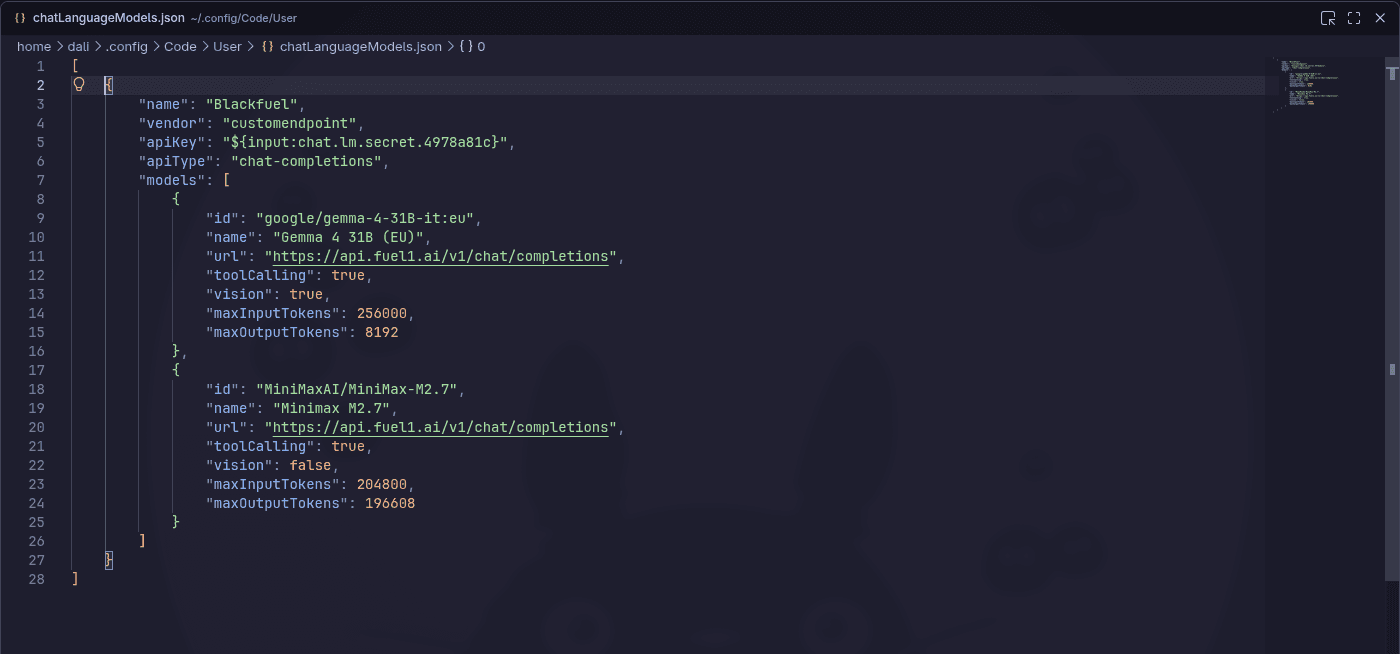
A Custom Endpoint provider group open in VS Code's chatLanguageModels.json.
What each field does:
| Field | Purpose |
|---|---|
name | The display label for the provider group (and each model) in the Copilot Chat model picker. |
vendor | customendpoint tells VS Code this is a BYOK custom provider. |
apiKey | A reference to your securely-stored key, injected at request time. Keep the field — the placeholder value is ignored, but removing it breaks the config. |
apiType | chat-completions — Blackfuel's OpenAI-compatible endpoint. |
url | Blackfuel's Chat Completions endpoint: https://api.blackfuel.ai/v1/chat/completions. |
id | The Blackfuel model ID. Add a :eu suffix to pin a model to EU data centers. |
toolCalling | true so Copilot's agent tools and MCP servers work. A model without it is left out of the picker in agent mode. |
vision | true for a model that accepts image inputs, so you can attach screenshots and images. |
maxInputTokens / maxOutputTokens | The input and output split you give VS Code; it treats the sum as the context window. |
Save the file. The models now appear as options in the Copilot Chat model picker.
Step 5: Pick a Blackfuel model in Copilot Chat
Open Copilot Chat, click the model picker in the chat input, and select GLM 5.2 or Gemma 4 31B (EU) under the Blackfuel group. Send a prompt to confirm it responds.
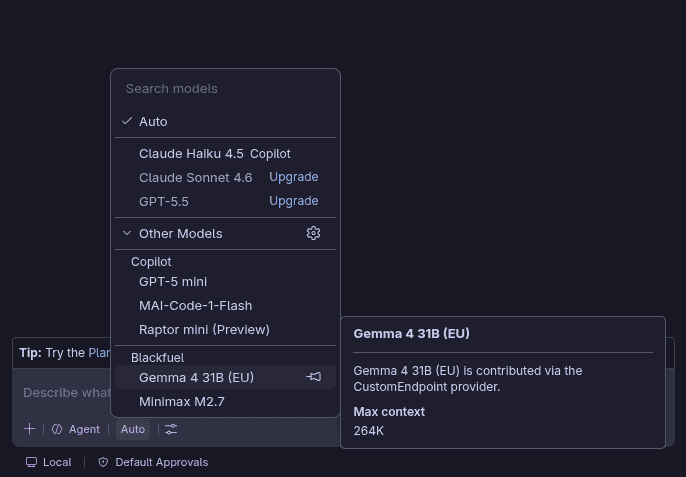
That's it — Copilot Chat now runs on Blackfuel.
Tips
- Which model when: use GLM 5.2 for code generation, edits, and agentic work. Switch to Gemma 4 31B (EU) when you need to attach a screenshot or image, or when EU residency is required.
- Prompt caching works in your favor: Copilot resends a lot of repeated context, and repeated input is billed at the cached-input rate (
pricing.input_cache_read) — so an interactive session typically costs less than the raw token count suggests. - Add more models: append another entry to the
modelsarray using any model ID from Available Models, then save. - Stay sovereign: any model with an EU variant can be pinned with
:eu. See the EU-Hosted Models table in Available Models.
Roll it out across your GitHub organization
The steps above configure one developer's VS Code. To give every developer in your GitHub organization access to Blackfuel models — with usage monitored centrally — an organization owner can register Blackfuel as a custom model provider in GitHub Copilot.
Organization custom models are in public preview, and GitHub lists OpenAI-compatible providers among the supported key types. An enterprise owner must enable the Enable custom models policy first. The per-developer setup in Steps 1–5 is separate: for Copilot Business and Enterprise users it needs the Bring Your Own Language Model Key in VS Code policy, which an administrator can disable.
- In your organization's Settings, under "Code, planning, and automation", open Copilot → Models → Custom models, then Add API key.
- Select the OpenAI-compatible provider and name the key — the name appears in the model picker. Blackfuel's OpenAI-compatible endpoint is
https://api.blackfuel.ai/v1. - Paste an organization Blackfuel key from the console, select the Blackfuel models to expose, and save. They appear in the model picker under your organization name.
The org-level key covers access — the shared key and which model IDs your developers can select. Each model's properties (context window, tool calling, vision) are configured per developer in chatLanguageModels.json; see Configuring model properties below.
Configuring model properties
Blackfuel's catalog lists which model IDs exist and what each one accepts; VS Code reads the capabilities it enforces from your own configuration. You set them in the per-model chatLanguageModels.json from Step 4 — the toolCalling, vision, and maxInputTokens / maxOutputTokens fields.
For an organization rollout, the org-level key grants access to the models; share the same chatLanguageModels.json with your team (for example via shared VS Code settings) so every developer gets identical model properties.
Source the values from the catalog when filling in each model entry:
chatLanguageModels.json field | What to enter | Where to find it |
|---|---|---|
toolCalling | true for models that support tools | supported_parameters includes tools in GET /v1/models |
vision | true for models that accept images | input_modalities includes image in GET /v1/models |
maxInputTokens | the context length, minus the output budget you chose | context_length in GET /v1/models |
maxOutputTokens | the output budget you want to reserve | your choice — VS Code adds it to maxInputTokens |
Pricing lives outside the Copilot config — Blackfuel bills per token at the published rate. Check a model's per-token input/output rates under pricing.prompt / pricing.completion in GET /v1/models or on Available Models.
Troubleshooting
| Symptom | Fix |
|---|---|
| Models don't appear in the picker | Re-open Chat: Manage Language Models and confirm the JSON saved without errors. The vendor must be customendpoint. |
401 Unauthorized | Your Blackfuel key is missing, wrong, or revoked (error.code is null when missing, invalid_api_key when wrong/revoked). Re-run Add Models and re-enter the key, or create a new one in the console. |
404 model not found | Check the id matches a model ID in Available Models exactly, including any :eu suffix. |
429 | Expected on busy interactive sessions. Back off and retry. |
| Tools / MCP not working | Make sure toolCalling is true for that model. |
| No inline completions | Expected — BYOK covers chat, tools, and MCP only, not autocomplete or NES. |
For the full list of error types and retry guidance, see the Error Handling guide.
Next steps
- Available Models — full catalog, pricing, and EU variants
- Migrate from OpenAI — point any OpenAI-compatible tool at Blackfuel
- Chat Completions — full endpoint reference
Connect via MCP
Connect Claude, ChatGPT, Cursor, or any MCP client to Blackfuel so your AI agent can run your account — OAuth sign-in, no API key.
GitHub Copilot CLI
Run GitHub Copilot CLI on Blackfuel's open-source models via its bring-your-own-model endpoint — transparent per-token pricing, and an EU option